|
<< Click to Display Table of Contents >> Parts of the Notation Window |
  
|
|
<< Click to Display Table of Contents >> Parts of the Notation Window |
|
The following picture identifies the main elements of Notation Player's window:
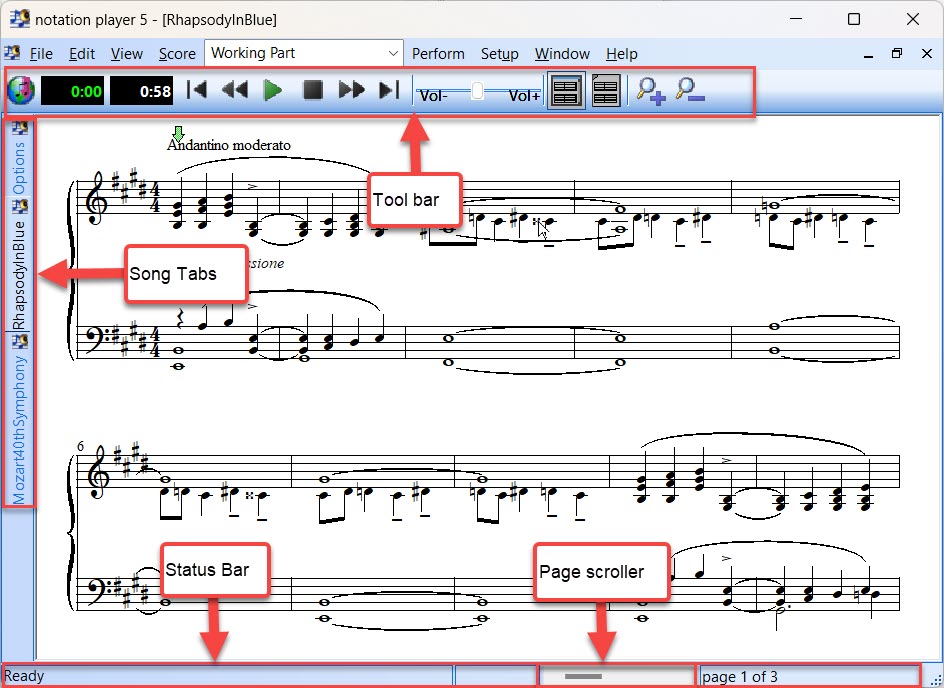
Each part of Notation Player's window is briefly described below. Some parts of the window are described in more detail throughout the remainder of this section.
•Toolbar
The toolbar offers a variety of buttons and controls for playing back songs; controlling the volume level; zooming in and out; and adding key signatures and clefs. The timer also shows the current time into the song, as well as the time left in the song. For details, see the Toolbar topic.
•Song Tabs
The song tabs let you quickly access any song that you have open with a single click of your mouse.
•Status Bar
The status bar shows:
-- the most recent tip or error message.
-- the Page Scroller, which allows you to quickly jump to any location in the score.
-- the page number of the currently displayed page.